
Timecode To Marker
Read the markers back out of a grandMA timecode object and export them for audio editors such as Reaper.
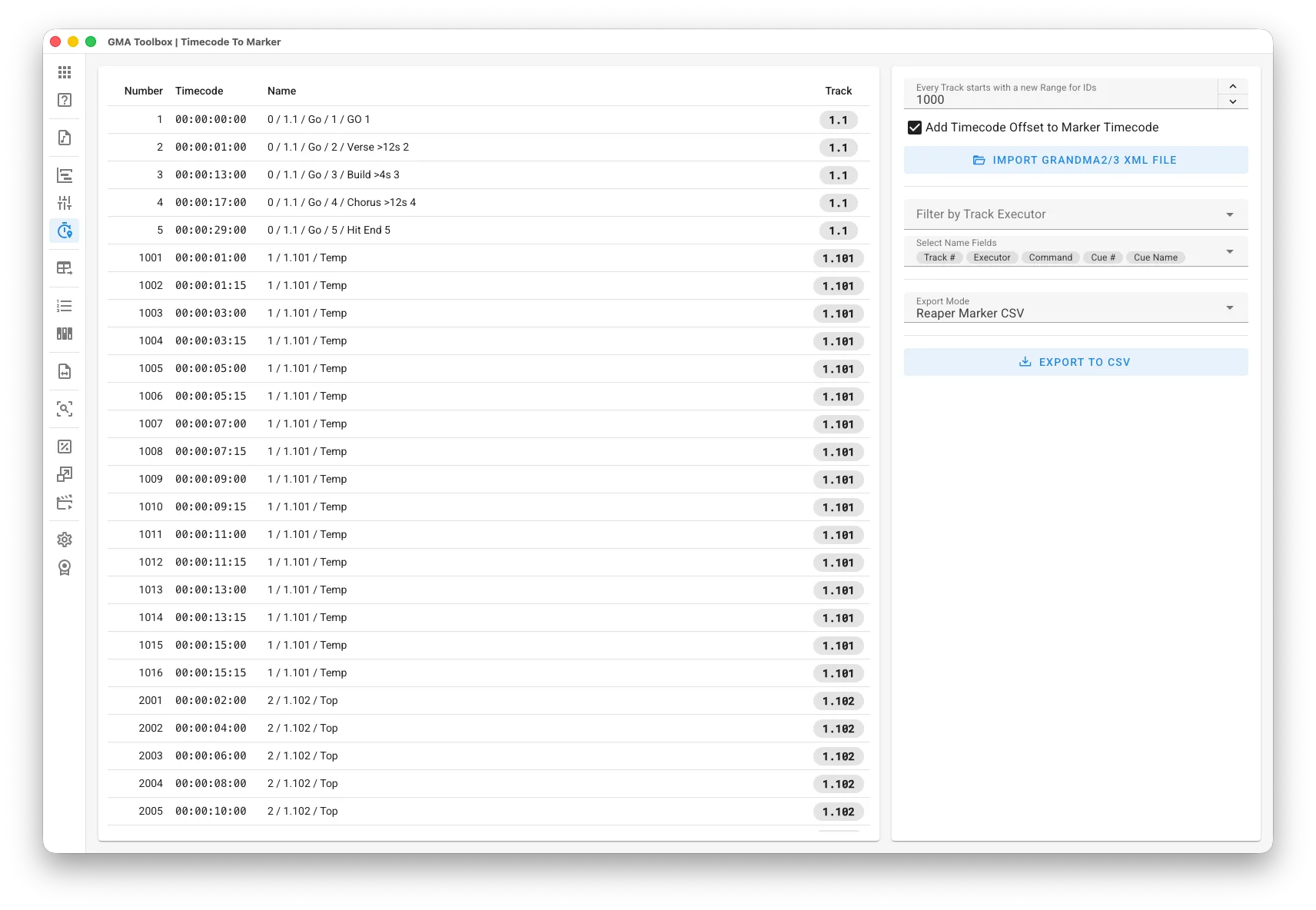
What it does
Section titled “What it does”- Converts timecode back to markers
Pull the markers out of a grandMA timecode object to get a clear picture of where every cue sits. Use it to recover the timing when the original Reaper or CSV marker file is gone. - Gives you a reference to work from
Take the markers of a timecoded show and use them to analyse it, adapt it, or build on it. Export as Reaper marker CSV or as generic CSV for any audio or timeline editor.
How to use it
Section titled “How to use it”- Get the timecode into the tool:
- Set the import options first.
- Straight from the console: click Import from grandMA2/3 Console, then set the console
mode, the IP address, the pool type (Timecode) and the IDs you want — for
example
1 + 5 Thru 8. The tool runs the export on the console and loads the result, so no USB drive is involved. The console needs its remote interface switched on first — see Console Connection. - From a file instead: select a USB drive, then run “
Export Timecode (number)” to write the timecode as XML. Import XML File reads that file.
You can also drag the .xml file straight onto the window.
- Set the export options:
- Choose the export mode:
Reaper Marker CSV writes the format Reaper expects.
Generic CSV writes a plain CSV format.
- Choose the export mode:
- Export the markers:
- Export to CSV writes the marker file.
- Import that file into your editor.
In Reaper: go to View > Region/Marker Manager, right-click the list and choose Import regions/markers…
The screen explained
Section titled “The screen explained”Import
Section titled “Import”- Every Track starts with a new Range for IDs: gives each track its own block of marker numbers, so you can tell the tracks apart.
- Add Timecode Offset to Marker Timecode: adds the internal timecode offset of the grandMA to every marker position.
Markers
Section titled “Markers”- Filter by Track Executor: show only the markers of one track executor.
- Select Name Fields: choose which fields make up the marker name.
Destination
Section titled “Destination”- Export Mode:
Reaper Marker CSV writes the format Reaper expects.
Generic CSV writes a plain CSV format.
For generic CSV only:
- CSV Field ‘Number’: the column that gets the marker number.
- CSV Field ‘Timecode’: the column that gets the time.
- CSV Field ‘Name’: the column that gets the marker label.
Table columns
Section titled “Table columns”- Number: the marker number.
- Timecode: the time of the marker.
- Name: the marker name, built as
Track / Page.Executor / CommandorTrack / Page.Executor / Command / Cue-ID / Cue-Name Cue-Number. - Track: the track the marker came from.